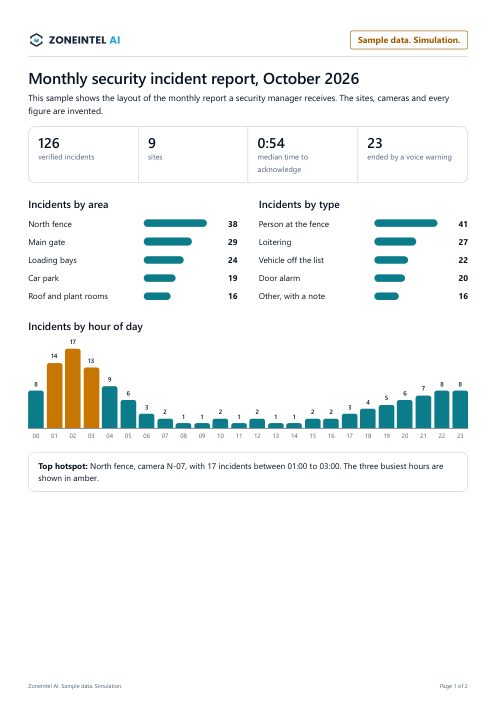
Monthly security incident report
Verified incidents for one month across nine sample sites, by area, by type and by hour of day.
- Incidents by site and by area
- Incidents by type and by hour
- How each incident ended
Each PDF shows the layout a security manager or a city team receives. The sites, districts and figures are invented, and every page is marked as sample data.
Verified incidents for one month across nine sample sites, by area, by type and by hour of day.
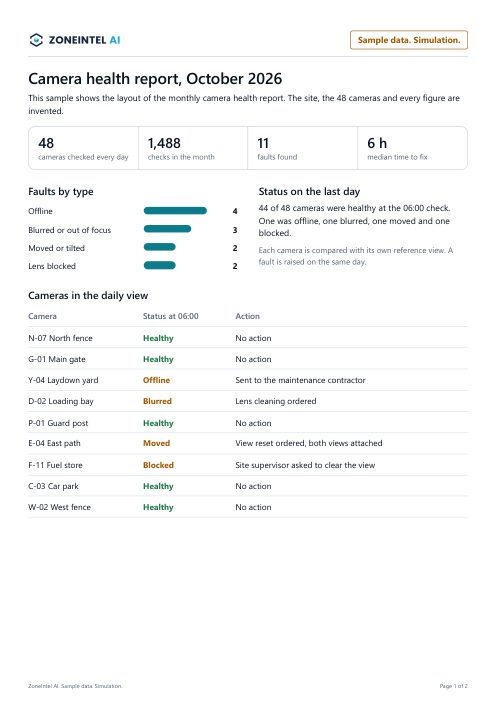
One month of daily checks on 48 sample cameras, with each fault, its cause and the time to fix.
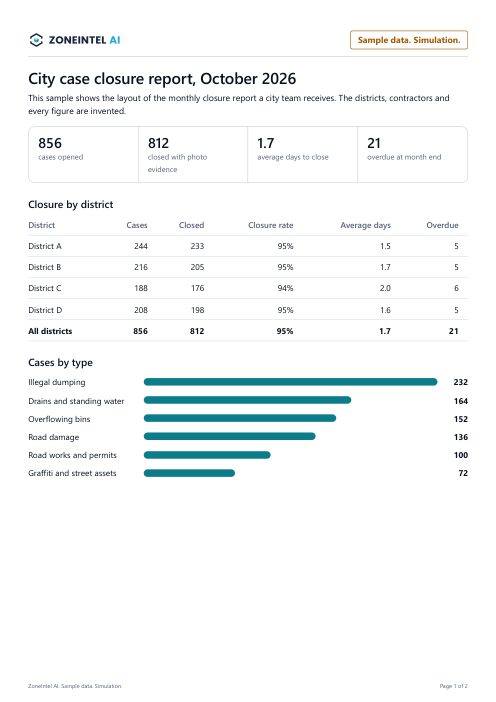
One month of city cases for four sample districts, with closure by district and by contractor.
City teams can also open the weekly city case report (PDF), which also uses sample data.
The three reports share one layout, so a manager reads each of them the same way.
These reports are samples for layout only. Every site, district, contractor and figure in them is invented, and each page is marked as sample data. They show the layout and the kind of content a customer receives.
The incident report goes to the security manager or the guard company’s client. The camera health report goes to the team that maintains the cameras. The closure report goes to the city or town council operations manager.
Reports are sent monthly by default. Weekly and daily versions use the same layout. Each report is approved by a named person before it goes out.
Integrators and guard companies can send reports under their own logo and colours. The figures come from the same incident and case records.
Send one night of footage and we return a free alarm report within five business days.