One link shows your client each incident while it is still open.
Clients call the control room during an incident because they cannot see what is happening. ZoneIntel AI sends them one link that shows the clip, the location and each step your operator takes.
Verified intrusion at Logistics yard, Tuas, north fence. Follow the live report: report link E-4471
The client can
- The report updates while the incident is open.
- The link ends when the access period you set runs out.
- Faces are blurred in the shared clip.
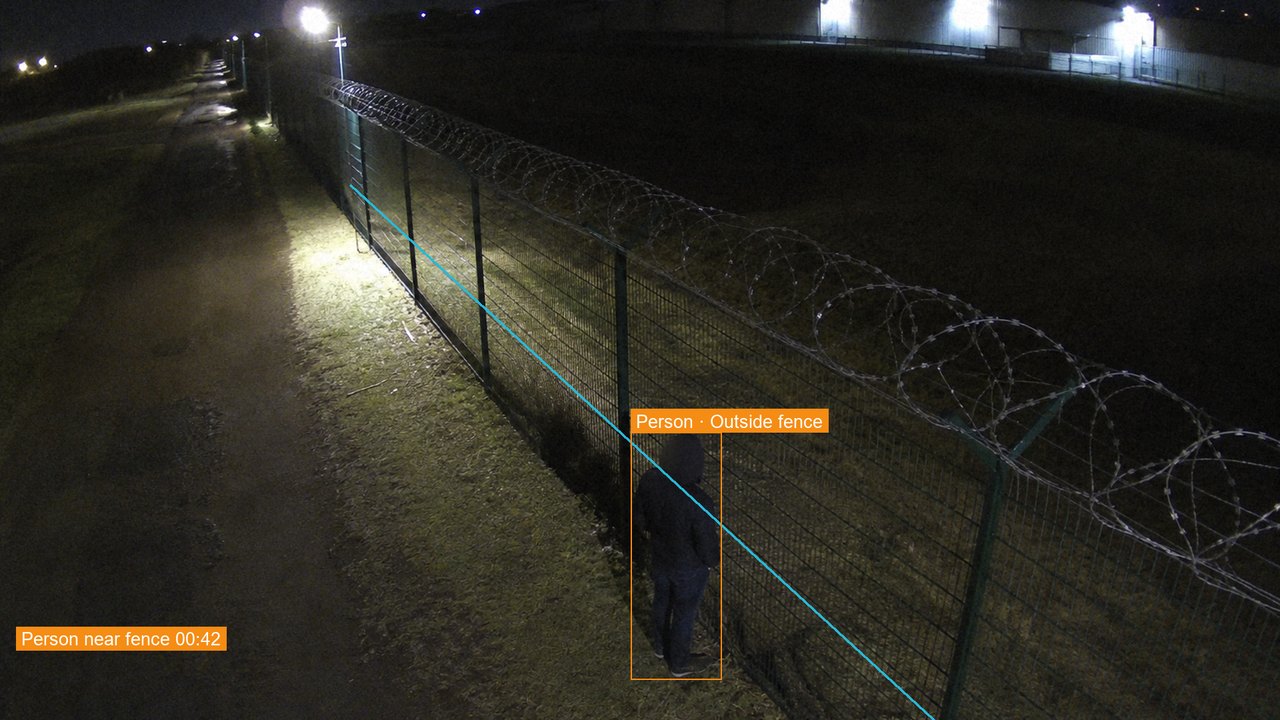 N-07, 23:14:05
Logistics yard, Tuas
- 23:14Person outside the fence, verified.
- 23:15Site contact called, no answer.
- 23:16Mobile patrol 2 sent, 4 min away.
- 23:17Operator: person still at the fence.
How the live incident report works
The link is sent as soon as an alarm is verified.
- An alarm is verifiedThe incident opens with its clip, camera and location.
- The link is sentThe client contact receives it by SMS or email.
- The report keeps updatingEach call, dispatch and note appears with its time.
- The incident closesThe link shows the outcome and the final record.
What you receive
Guard companies and control rooms give each client a clear view of the response.
- A report per incidentClip, location, timeline and operator notes on one page.
- A client responseThe client can add a note or stand the patrol down.
- Controlled accessLinks expire, and faces are blurred in shared clips.
- A final PDFThe closed report is saved to the client’s records.
Questions about the live incident report
What is a live incident report?
It is a web page for one incident that updates while the incident is open. The client sees the clip, where it happened, each action taken and the operator’s notes.
Does the client need an account or an app?
The link opens in any phone or desktop browser. Each link works for one incident and ends after the access period you set.
Can the client stop a dispatch?
A client contact with the right role can stand a patrol down from the report, for example when the person is a known contractor. The action is recorded with the name and time.
Who can see the report?
Only the contacts you list for that site receive the link. Faces are blurred in the shared clip by default, and each view of the report is logged.
Show your clients what your operators do.
Book a demo and we open a sample incident on your phone, from the alert to the closed report.